Contents
OSインストール
Raspberry Pi ImagerからRspbery Pi OS (Other)でRASPBERRY PI OS LITE (64-BIT)を選択してmicroSDにインストール
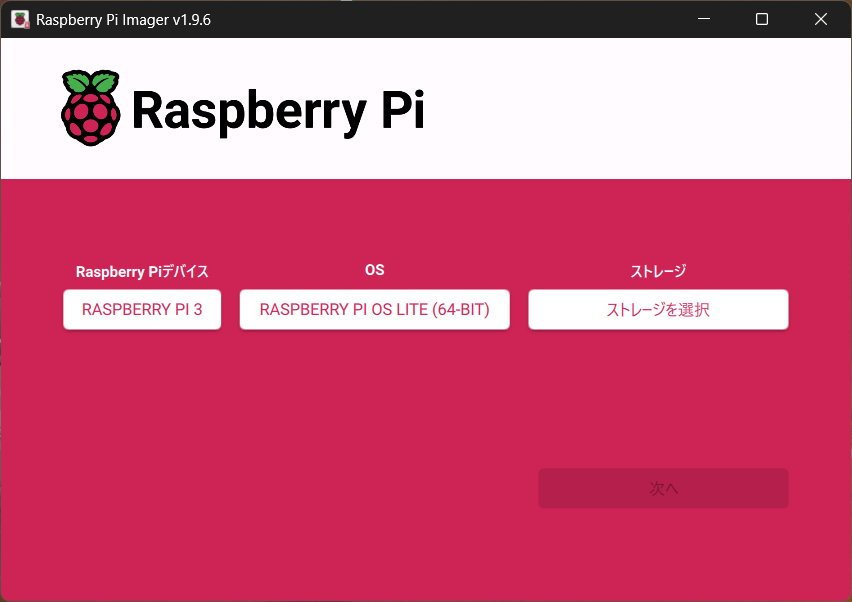
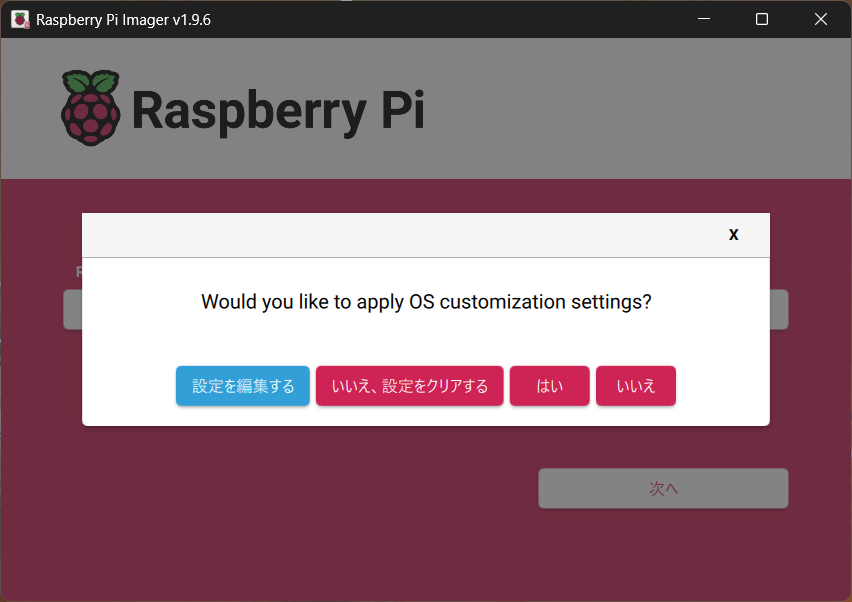
最近のRaspberry Pi OSはデフォルトのpi/raspberryが有効化されてないので、OS customization settingsでuser/passwordを作成しておく必要がある。
シリアルコンソール有効化
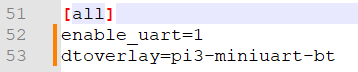
microSDカード内にあるconfig.txtを直接編集してシリアルコンソールを有効化する。
Raspberry Pi 3BではデフォルトではBluetoothがUART0を使ってしまっておりシリアルコンソールが使えないため、enable_uart=1とdtoverlay=pi3-miniuart-btを追記しておく必要がある。
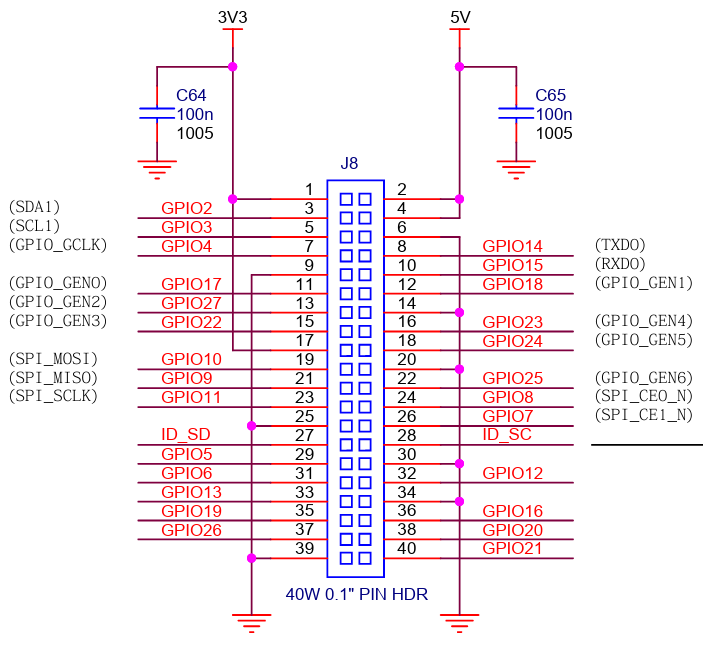
USB-UARTケーブル接続
USB-UARTケーブルをGPIOの6(GND), 8(RX), 10(TX)に接続。
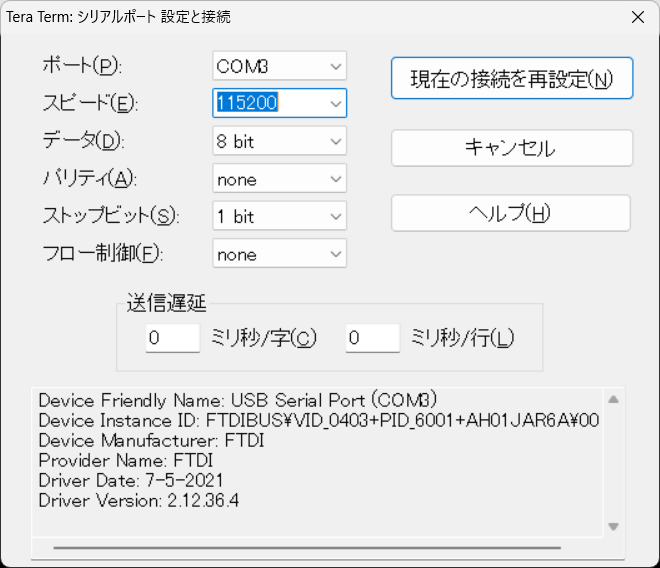
Tera Termのシリアル設定を以下の様に設定。
デフォルトの起動時間確認
systemd-analyzeで確認できる。
|
1 2 3 |
pi@raspberrypi:~$ systemd-analyze time Startup finished in 5.344s (kernel) + 23.929s (userspace) = 29.274s multi-user.target reached after 17.474s in userspace. |
全体としては約30秒もかかっている。
時間がかかっているサービスを確認
|
1 2 3 4 5 6 7 8 9 10 11 12 13 14 15 16 17 18 19 20 21 22 23 24 25 26 27 28 29 30 31 32 33 34 35 36 37 38 39 40 41 42 43 44 45 46 47 48 49 50 51 52 53 54 55 56 57 58 59 60 |
pi@raspberrypi:~$ systemd-analyze blame 6.022s NetworkManager-wait-online.service 5.479s cloud-init-main.service 5.189s NetworkManager.service 2.770s dev-mmcblk0p2.device 2.529s e2scrub_reap.service 1.225s polkit.service 1.224s cloud-init-network.service 1.199s ModemManager.service 1.059s user@1000.service 902ms wpa_supplicant.service 687ms rpi-resize-swap-file.service 659ms cloud-init-local.service 585ms systemd-udev-trigger.service 562ms systemd-rfkill.service 552ms systemd-udevd.service 544ms systemd-fsck@dev-disk-by\x2dpartuuid-a7b30dab\x2d01.service 498ms keyboard-setup.service 495ms modprobe@drm.service 485ms modprobe@configfs.service 483ms avahi-daemon.service 483ms dev-mqueue.mount 483ms sys-kernel-debug.mount 481ms run-lock.mount 480ms sys-kernel-tracing.mount 479ms bluetooth.service 457ms kmod-static-nodes.service 436ms modprobe@fuse.service 417ms dbus.service 404ms cloud-final.service 404ms systemd-tmpfiles-setup.service 365ms systemd-zram-setup@zram0.service 349ms systemd-binfmt.service 347ms systemd-journald.service 341ms systemd-modules-load.service 327ms systemd-timesyncd.service 318ms systemd-logind.service 308ms cloud-config.service 299ms systemd-remount-fs.service 293ms systemd-hostnamed.service 285ms rpi-setup-loop@var-swap.service 275ms systemd-user-sessions.service 272ms systemd-tmpfiles-setup-dev-early.service 266ms sshswitch.service 263ms console-setup.service 258ms systemd-sysctl.service 240ms systemd-udev-load-credentials.service 237ms systemd-random-seed.service 183ms sys-kernel-config.mount 179ms systemd-journal-flush.service 168ms alsa-restore.service 165ms sys-fs-fuse-connections.mount 149ms rpi-eeprom-update.service 137ms proc-sys-fs-binfmt_misc.mount 134ms dev-zram0.swap 123ms systemd-tmpfiles-setup-dev.service 119ms boot-firmware.mount 102ms tmp.mount 97ms user-runtime-dir@1000.service 71ms modprobe@efi_pstore.service |
起動時間が長いものから順に起動停止できないか確認していく。
サービス停止
必要なさそうなものを無効化していく。
sudo systemctl disable NetworkManager-wait-online.service
sudo systemctl disable ModemManager.service
sudo systemctl disable cloud-init-network.service
sudo systemctl disable cloud-init-local.service
sudo systemctl disable cloud-init-main.service
sudo systemctl disable buletooth.service
不要なハード・ドライバの無効化
基本的にはほとんど機能を使わないのでconfig.txtを編集して無効化
pi@raspberrypi:~$ sudo vim /boot/firmware/config.txt
#dtparam=audio=on
#camera_auto_detect=1
#dtoverlay=vc4-kms-v3d
#max_framebuffers=2
dtoverlay=disable-wifi
dtoverlay=disable-bt
ここまでの結果が以下。
10秒は縮めることができた。
|
1 2 3 4 5 6 7 8 9 10 11 12 13 14 15 16 17 18 19 20 21 22 23 24 25 26 27 28 29 30 31 32 33 34 35 36 37 38 39 40 41 42 43 44 45 46 47 48 49 50 51 52 53 54 55 56 57 58 59 60 61 62 63 64 65 66 67 68 69 70 71 72 73 74 75 76 |
pi@raspberrypi:~$ systemd-analyze time Startup finished in 5.299s (kernel) + 12.055s (userspace) = 17.354s multi-user.target reached after 11.963s in userspace. pi@raspberrypi:~$ systemd-analyze blame 4.779s NetworkManager.service 2.537s dev-mmcblk0p2.device 1.007s e2scrub_reap.service 827ms user@1000.service 586ms keyboard-setup.service 578ms rpi-resize-swap-file.service 547ms systemd-fsck@dev-disk-by\x2dpartuuid-a7b30dab\x2d01.service 510ms sys-kernel-debug.mount 496ms run-lock.mount 494ms systemd-udev-trigger.service 488ms dev-mqueue.mount 483ms modprobe@efi_pstore.service 474ms modprobe@fuse.service 472ms sys-kernel-tracing.mount 467ms cloud-init-local.service 466ms systemd-udevd.service 465ms modprobe@drm.service 459ms modprobe@configfs.service 446ms kmod-static-nodes.service 377ms systemd-journald.service 376ms systemd-modules-load.service 360ms avahi-daemon.service 348ms systemd-zram-setup@zram0.service 339ms systemd-remount-fs.service 315ms dbus.service 311ms wpa_supplicant.service 286ms systemd-udev-load-credentials.service 277ms systemd-timesyncd.service 253ms systemd-logind.service 246ms systemd-hostnamed.service 239ms rpi-setup-loop@var-swap.service 222ms sshswitch.service 209ms systemd-binfmt.service 185ms systemd-tmpfiles-setup-dev-early.service 182ms systemd-tmpfiles-setup.service 182ms systemd-sysctl.service 161ms rpi-eeprom-update.service 161ms systemd-random-seed.service 161ms cloud-init-network.service 153ms systemd-journal-flush.service 148ms sys-kernel-config.mount 142ms sys-fs-fuse-connections.mount 117ms dev-zram0.swap 116ms tmp.mount 105ms systemd-tmpfiles-setup-dev.service 103ms boot-firmware.mount 102ms console-setup.service 98ms systemd-user-sessions.service 83ms user-runtime-dir@1000.service 78ms proc-sys-fs-binfmt_misc.mount 77ms cloud-final.service 75ms cloud-config.service pi@raspberrypi:~$ systemd-analyze critical-chain The time when unit became active or started is printed after the "@" character. The time the unit took to start is printed after the "+" character. multi-user.target @11.963s mqgetty.target @11.960s mqserial-getty@ttyAMA0.service @11.957s mqsystemd-user-sessions.service @11.842s +98ms mqnetwork.target @11.825s mqNetworkManager.service @7.042s +4.779s mqdbus.service @6.706s +315ms mqbasic.target @6.686s mqsockets.target @6.684s mqsystemd-hostnamed.socket @6.682s mqsysinit.target @6.645s mqsystemd-binfmt.service @6.433s +209ms mqproc-sys-fs-binfmt_misc.mount @6.550s +78ms mqsystemd-journald.socket @3.302s mq-.mount @3.002s mq-.slice @3.002s |